Car Wash Reporting: Knowing What’s Happening Across Your Sites Without Chasing People
Reporting at a car wash is often treated as a destination: a screen you open when you need an answer. That screen matters, and OPEn has one designed to answer common questions. But reporting is a broader topic than a single reports page.
Robust Reporting Is Broader Than a Reports Screen
Managers still need a place to go when they have a common question. They also need information to reach them as work happens: a daily picture of what’s still open, a score that shows how a site inspection went, a notice when inventory is off, or an alert when an Issue needs attention.
That’s operational reporting. It’s visibility into operational performance, exceptions, trends, and activity at each location, so you can see whether processes were followed, problems were closed, and sites are staying close to the standard you set.
How OPEn Helps Car Wash Operators Stay Informed
OPEn includes a reports screen for common questions, and it also includes informational tools throughout the product. Some of those tools are CSV exports, the checklist scorecard, daily summary emails, optional checklist completion emails, inventory rebalance alerts, and Issue email alerts.
A Reports Screen for Common Questions
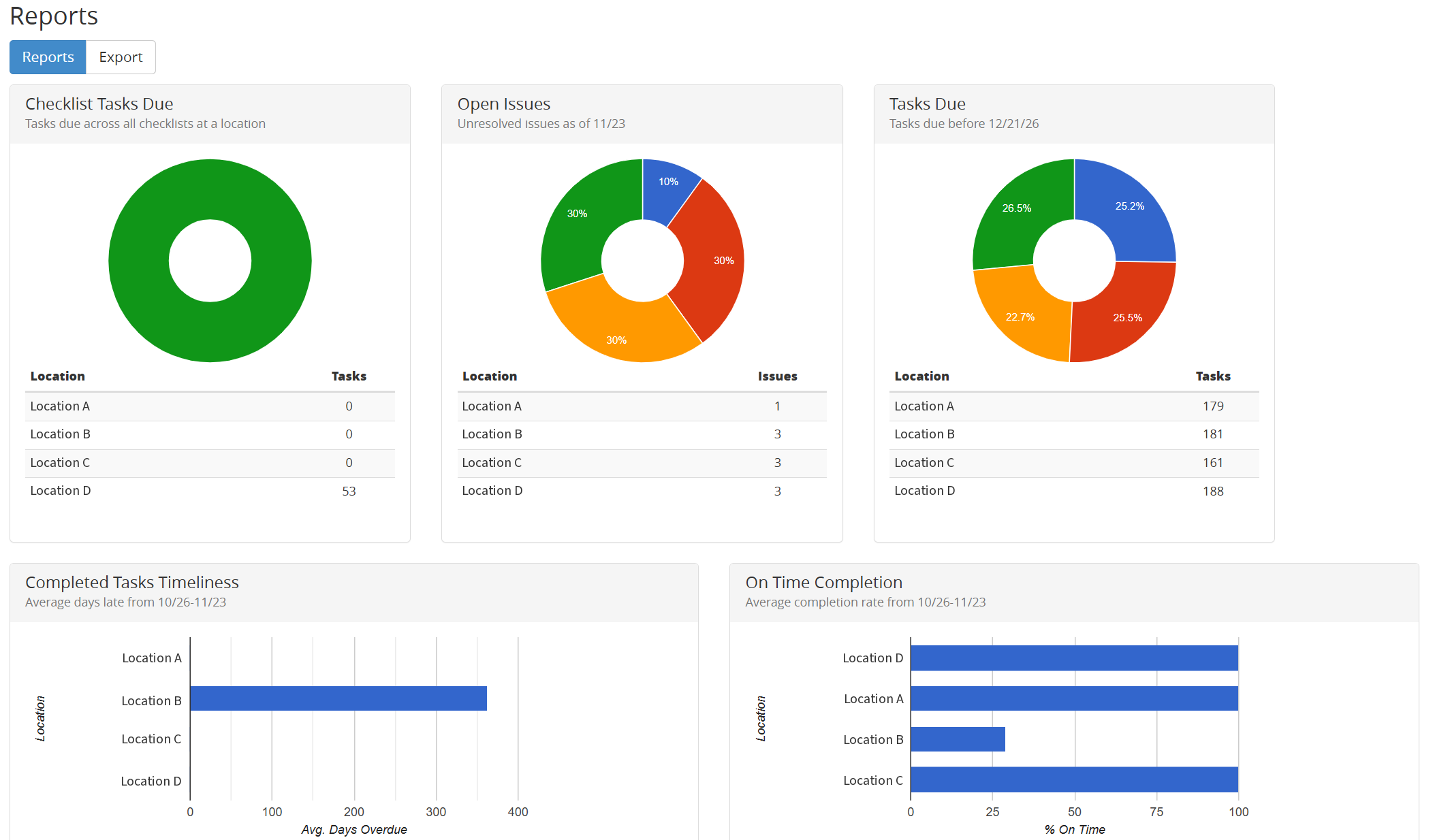
OPEn has a reports screen designed to answer common questions. It can help you quickly see where to focus your attention, including checklist tasks due, open Issues, tasks due, completed-task timeliness, and on-time completion, each broken out by location.
Exports When You Need the Information Elsewhere
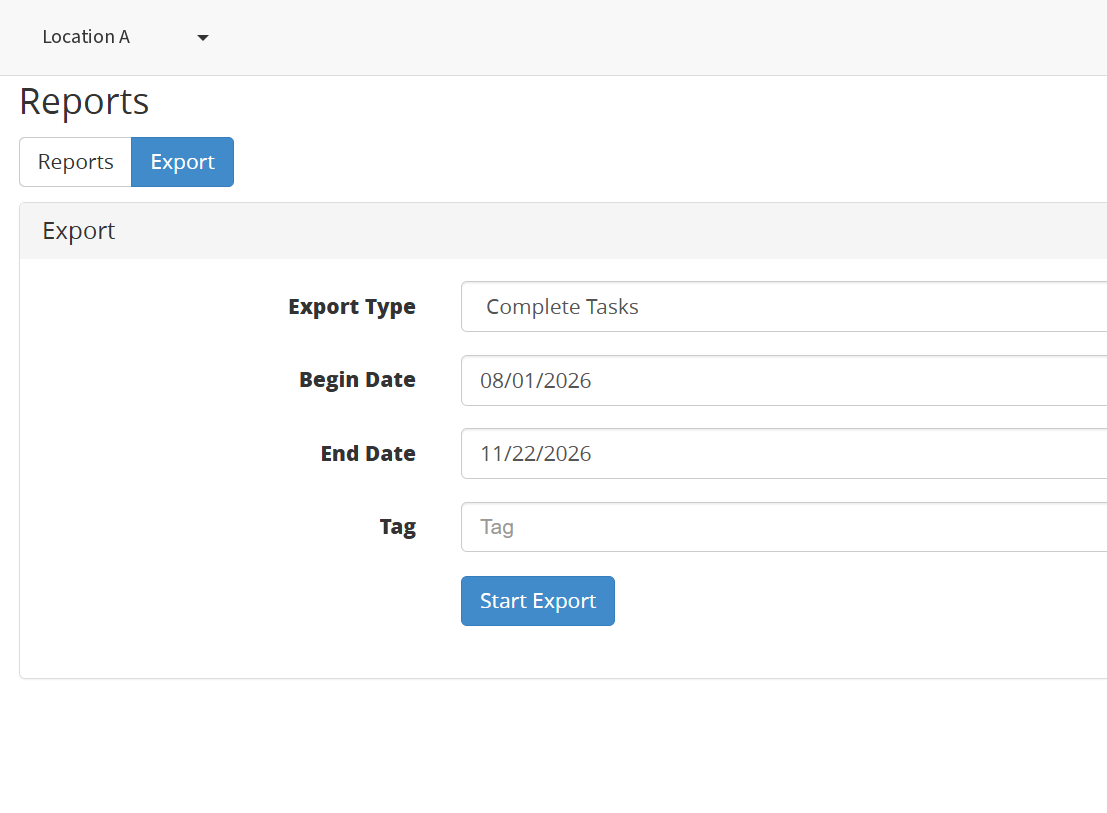
OPEn also has a set of CSV exports for certain types of data the reports don’t cover today. For example, you can export tasks completed during a date range you pick, and you can narrow the export with an optional tag.
The Checklist Scorecard
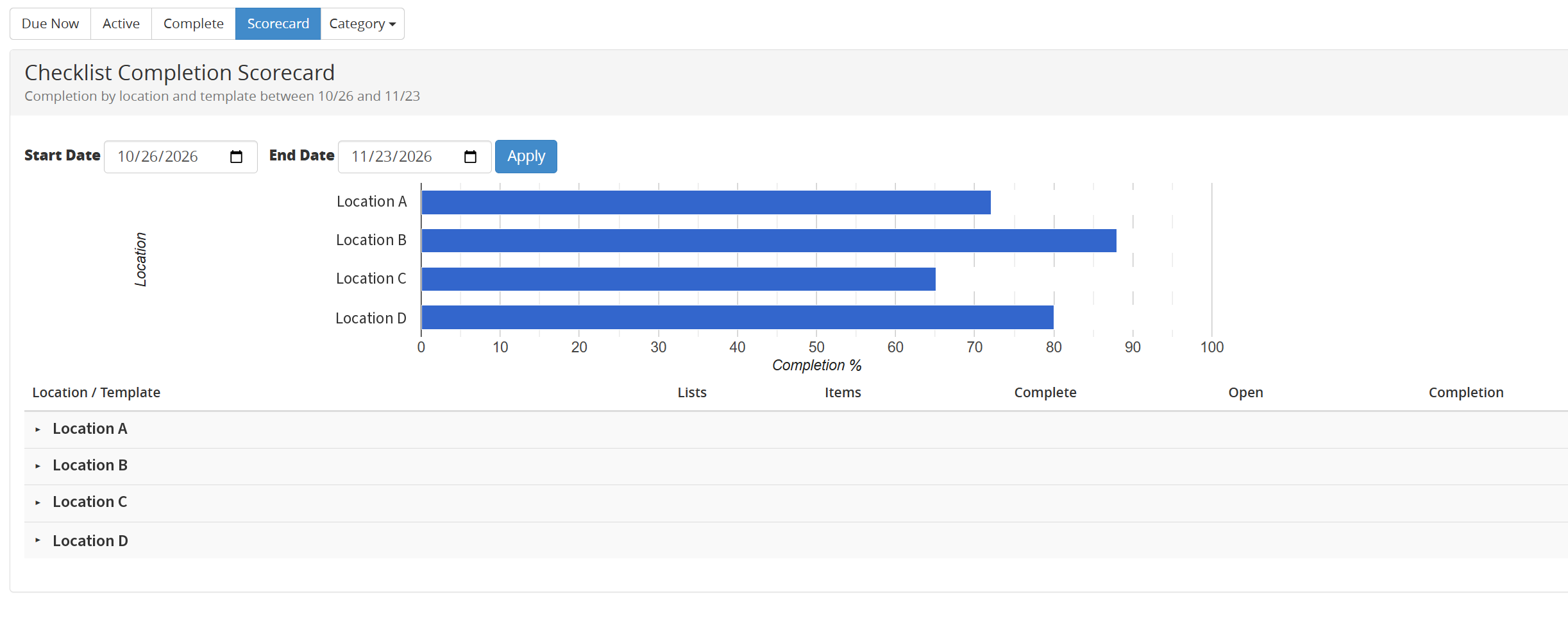
The checklist completion scorecard shows completion by location and checklist template over a date range you choose. You can see counts of lists, items, completed items, and open items, plus a completion percentage, so you can tell which sites are keeping up.
OPEn also supports site inspections, which are scored checklists, to help provide a measurement of how close a team is to matching expectations.
Daily Summary Emails, Based on Your Preference
You can receive a daily summary of all your open maintenance tasks, checklists and open issues, based on your user preference. It’s a straightforward way to start the day with a picture of what’s still open, even if you aren’t on site.
Optional Checklist Completion Emails
Checklists can be set up to email a recipient when they’re completed. This is optional, so you can use it where a finished checklist should be visible right away.
Scored site inspections are a good example. Instead of opening every inspection to see how a site did, the completed inspection can be emailed as soon as it’s done.
Inventory Rebalance Alerts
MIN/MAX alert emails help managers rebalance inventory from their own stock. The emails go to assigned team members and show items that are under stock and need replenishing, together with parts that are overstock.
When a part falls below a minimum, or builds up beyond a maximum, the team can see that it is time to restock or move product to the location that needs it.
Learn more about site-level inventory, including MIN/MAX alerts and rebalancing, on the car wash inventory management page.
Issue Email Alerts
Specific team members can be set up to receive Issue emails. Those emails go out as Issues are entered or updated, as close to that moment as possible, because a problem can turn out to be more serious than it first looked. Issues in OPEn are the repairs and other operational problems your team logs, assigns, and tracks through to resolution.
Email Feeds Can Also Inform an AI Assistant
If you use an AI assistant, some of the same email feeds can go to an address it can read, including daily summaries and completed checklists. Incident updates can be emailed that way too, so changes to a customer damage claim don’t have to be forwarded by hand.
That gives the AI assistant the same operational picture your team receives, so it can help you review sites and notice what needs attention. See how operators connect an AI assistant to OPEn through the official API and email feeds.
Since 2015, Wash Systems has worked exclusively with car wash operators.
Book a 30-minute OPEn demo to see how the reports screen and the rest of OPEn’s informational tools fit together.